NETGATE Registry Cleaner cleans and defragment your registry, speed-up your PC, removes unneeded files on disks, removes activity traces. It includes Startup manager to manage programs started at Windows startup and Uninstall manager for handy applications uninstall. Supports scheduling of scans and backup option for better security.
Features: * Registry Defragmentation * Registry Backup and Restore * Startup Manager - manages all applications that starts at Windows startup * Uninstall Manager - handy tool for quick uninstall of application from your system * Backup - all removed items are stored in backup until permanent deletition; it can be restored anytime * Registry Cleanup * Disk Cleanup * Traces Removal * Scheduling support * Multilanguage translation support * Skin support * Premium technical support * Registry Shield Protection
TuneUp Utilities 2011 can quickly make your Windows operating system faster, easier to use, and more secure. And all operations performed on the operating system are completely safe, because all changes are monitored by TuneUp Rescue Center and can be undone at any time. All TuneUp Utilities modules can be accessed through a common interface that is divided into six categories. In addition, the main window also has three general buttons in a dark gray bar to the right at the top of the window. Pressing the first button starts the TuneUp Rescue Center module. The second button starts the TuneUp Update Wizard, which can be used to update TuneUp Utilities 2009 to the latest version over the Internet. The last button provides help and settings that you can use to customize the software package to meet your needs.
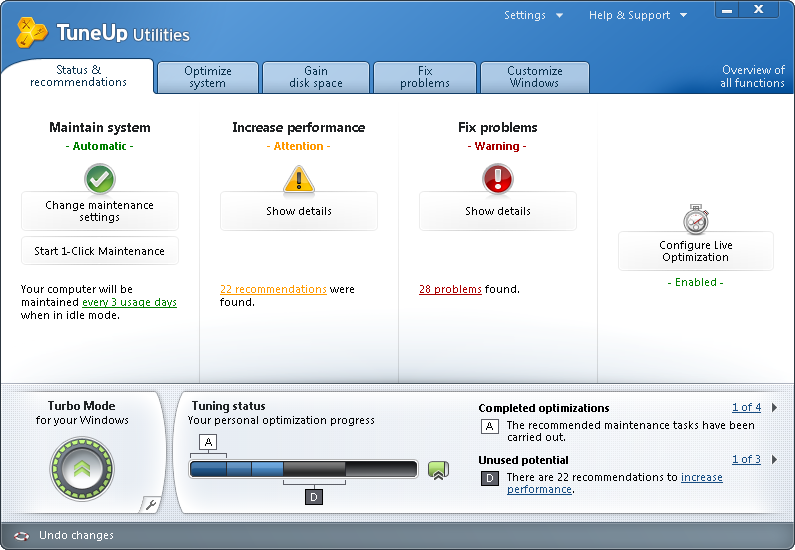
The new Start page TuneUp Utilities 2011 welcomes you with a completely redesigned Start page, which tells you about the status of your computer. If problems or nonoptimal settings are found, you are only a mouse-click away from resolving them. The Start page also tells you when new tips for increasing computer performance are available and warns you if maintenance tasks are not being taken care of automatically. The Start page also shows you whether new automatic startup programs have been added to Windows since the last time you ran TuneUp Utilities. You can decide whether these programs that start up automatically are really necessary.
TuneUp Speed Optimizer Which settings slow your computer down? Which unnecessary services or programs are running in the background? Is your Internet connection optimally configured? TuneUp Speed Optimizer knows the answers to all these questions. It examines your entire system for bottlenecks, superfluous background programs, and incorrect settings. Great: with just one click you can carry out most optimizations very quickly. In addition, TuneUp Speed Optimizer provides suggestions for speeding up your system.
TuneUp Shortcut Cleaner Cleaning up your working environment is tedious: removing invalid shortcuts from the Start menu, the Desktop, and the Quick Launch bar is very time-consuming. TuneUp ShortCut Cleaner now does the work for you. It checks whether all shortcuts are valid and removes the orphaned ones with just a click of a button. At the same time, empty folders are removed from the Start menu. TuneUp ShortCut Cleaner also checks frequently used programs and cleans up the list of recently opened files.
Support for the Opera browser After hard disk defragmentation, which we introduced in TuneUp Utilities 2009, the feature most requested by customers was support for the Opera browser. TuneUp Utilities 2011 now also includes full support for Opera. Via several special Opera settings, TuneUp System Control now allows you to change the number of Speed Dial entries, conveniently choose your default search engine, and reenable fast backward and forward navigation. Internet optimization lets you optimize Opera's performance for your Internet connection. Free up disk space lets you delete the Opera cache.
TuneUp Styler Now you can also change the Vista logo animation which appears just before logon. You can download a whole series of great animations from the TuneUp website. Or, if you prefer, you can choose your own personal image to display while Vista starts up. With Vista, you can also add your own images to Vista's logon screen: With just a few mouse clicks you can create a truly personal logon experience.
TuneUp Uninstall Manager Redesigned from the ground up, TuneUp Install Manager now runs much faster and has a new, even more intuitive interface so that it is even easier to uninstall unnecessary programs. Unnecessary programs often are forgotten because they were installed a long time ago and then not used. TuneUp Utilities 2009 shows you a list of programs not used for a long time so that you can target for uninstallation those applications that use valuable disk space and in certain circumstances even slow your system down.
TuneUp StartUp Manager A smooth-running system results when there are no unnecessary autostart applications. The improved TuneUp Startup Manager organizes your programs into groups and provides clear explanations to make it easier for you to identify those programs that are not needed.New automatic startup programs are now highlighted so that you can disable unwanted entries more easily. System start tasks are now also listed in TuneUp StartUp Manager In Vista, in particular, scheduled tasks are used in place of autostart entries.
Free up disk space The already rapid display of disk space to be freed up is now even faster on NTFS drives. And now it is so easy to delete even more unnecessary files, like the backup files for the first Windows Vista service pack and the Opera and Safari caches. The second "Free up disk space" module that helps you turn off Windows functions that use excessive disk space has also been enhanced. The Windows Search index can now be disabled and deleted with a single click. This makes particular sense if you are already using a different search engine. In addition, TuneUp Disk Space Explorer now runs faster and no longer requires that an entire drive be analyzed. You can now specify that only those folders be analyzed that you are really interested in.
Lots more improvements Along with the totally new features, there are a series of improvements that are not immediately visible. There are small improvements like Tooltips in the main window, a substantial increase in the number of problems that can be found byTuneUp Registry Cleaner, and better progress feedback from TuneUp Drive Defrag. But there are also big improvements "under the hood". Two good examples are a completely reworked installation program and significant improvements in our update technology.
System Mechanic® keeps your PC running faster, cleaner and error-free. Its powerful arsenal of 40+ award-winning precision tools fixes stubborn errors, cleans out clutter, optimizes internet and download speeds, ensures personal security and maintains maximum computer performance automatically. Over 98% of PC problems are caused by clutter and faulty settings that are the result of everyday PC use. System Mechanic automatically repairs errors and fragmentation, cleans out clutter, and tunes up your PC - so that it runs smoothly, reliably, and up to 300% faster!
Don't waste money on expensive "experts" to fix your PC when System Mechanic will repair, tune, and maintain it for you! Enjoy that new PC feeling again. Clear out clutter and errors for improved speed and reliability. Optimize your PC to play the latest high-performance games at maximum speeds. Accelerate download and web surfing speeds up to 300%.
Advanced PC Tune-Up plus: • Certified virus protection • Internet intruder defense • Deleted Data Rescue • Secure Data Removal
iolo AntiVirus™ provides industry-certified protection from viruses, worms, trojans, and other threats by using an advanced real-time engine that provides continuous maximum protection. It includes fully integrated email scanning, hourly virus definition updates, and an intuitive interface that makes it easy to maintain a permanently virus-free PC.
iolo Personal Firewall™ blocks unwanted communication to and from PCs, keeping private information safe from hackers and identity thieves. Its proprietary IntelliDefense® system eliminates security guesswork by automatically deciding which programs should connect to the internet using a program database of thousands of behavior profiles.
Search and Recover™ rescues accidentally deleted pictures, videos, email messages, documents, spreadsheets, system files, and any other file or folder from hard drives, CD/DVDs, music players, digital cameras, memory cards, and virtually all other portable digital devices.
DriveScrubber® securely erases sensitive data to prevent it from falling into the wrong hands when selling, donating, recycling, or reassigning a computer. DriveScrubber overwrites and removes information permanently, using strict government and military standards to provide protection from even the most sophisticated forensic recovery methods.
New in Version 10
NEW - Program Accelerator™ Over time, the many files that make up a program drift apart and become scattered across the hard drive. The new Program Accelerator realigns these program files, resulting in programs that launch faster and respond more quickly. - CRUDD Remover™ The new CRUDD Remover detects and displays the redundant programs that can impact PC performance and stability, and then you decide which programs you want to keep or remove. - Broken Internet connection repair A new repair feature that fixes damaged or broken Internet connection problems caused by destructive software is now in ActiveCare® and the PC Repair PowerTool™. - Whole Home™ Licensing Previously, one System Mechanic license could be installed on up to 3 PCs. Because many people now have more than three computers, System Mechanic is now licensed under the Whole Home™ Licensing program, which allows you to use one System Mechanic license on all of the PCs in your household.
ENHANCED - Tune-up Definitions™ Tune-Up Definitions, the weekly research updates automatically delivered to System Mechanic customers, have significantly expanded and grown from one category to five, capturing even more data about the issues that impact PC performance. - DriveAccelerator™ The drive defragmentation technology in DriveAccelerator is re-engineered both to incorporate new features in Windows 7 and to work in conjunction with the new Program Accelerator. - PC TotalCare® More cleanup, repair, and optimization functions are now in PC TotalCare, the all-in-one PowerTool™ that provides a complete PC tune-up for overall performance improvements. - PC Accelerator New detection and optimization functions are added to PC Accelerator, the all-in-one PowerTool™ that speeds up web access, boot times, program functioning, and more. - PC Repair New detection and repair functions are added to PC Repair, the all-in-one PowerTool™ that can detect and fix hundreds of critical system problems. - ActiveCare® ActiveCare adds more automated tasks, enabling System Mechanic to automatically detect and repair more problems. - System Guard® System Guard®, the automatic system defense tool, has undergone several enhancements, including simplified functionality for enabling the feature and full compatibility with 64-bit machines. - User interface The System Mechanic interface is redesigned to allow for streamlined access to the program's expanded feature set.
Advanced Registry Clear is an easy-to-use, decent and high-efficiency registry cleaner and optimizer that fixes all your registry errors, system bugs and other common problems and sweeps Internet tracks, IE cookies, temporary Doc files, etc. to make your PC and your personal information more stable and securer. Why Choose Advanced Registry Clear
• All-in-one Combined registry scan and repair with system optimizer, privacy sweep and other utilities such as disk checker, disk cleaner, file pulverizer…, Advanced Registry Clear can meet all your needs of registry software: streamlining registry, improving system, protecting privacy, and more, just imagine.
• Fast & Professional Advanced Registry Clear keeps itself focused on offering the best free registry cleaner and optimizer, and with the continuous introduction of new and advanced technology into it, Advanced Registry Clear is capable of integrating and optimizing your registry in just a few minutes.
• 100% safe and free Advanced Registry Clear would like to allow users to enjoy the free software, clean and safe PC environment. There is no adware, no spyware, no viruses in it, and it will never let you down.
• Extremely easy to use With the intuitive interface, simple and clear navigation, even the novice can immediately handle Advanced Registry Clear.
• Fully Automated Advanced Registry Clear has a time scheduler and carries out regular automated scan and sweep of your system. This considerable app makes every effort to save your time.
Raxco PerfectDisk Professional có 1 giao diện rất đẹp và dễ nhìn. Trước khi dồn đĩa, Raxco PerfectDisk hỗ trợ chức năng Analyze dùng để phân tích đĩa cứng, đưa ra bảng thống kê sự phân bố các file trên đĩa, các chỉ số về quá trình dồn đĩa, … Việc dồn đĩa được mô tả bởi 1 bảng các ô màu, rất dễ nhìn và theo dõi sự hoạt động của nó. Raxco PerfectDisk hoạt động khá nhanh và không tốn nhiều tài nguyên của máy tính.
Ngoài chức năng dồn đĩa mạnh mẽ, Raxco PerfectDisk Professional còn được bổ sung thêm các tính năng như: quét registry và dọn dẹp file rác, xóa dấu viết sử dụng máy và tinh chỉnh các thiết lập của hệ thống
Tính năng nổi bật
1. Giao diện mới hoàn toàn. Với phiên bản này, chúng ta sẽ thấy rõ sự khác biệt hoàn toàn về giao diện, giúp người dùng sử dụng chương trình đơn giản hơn rất nhiều. Từ Menu đến thanh công cụ, đã được sắp xếp lại một cách khoa học hơn, cụ thể, với những chức năng riêng biệt. Và mỗi khi rê chuột đến những Button chức năng đó, sẽ xuất hiện thông tin cụ thể như chức năng của mỗi Button.
2. StealthPatrol™ automatic disk defragmentation: Tự động sắp xếp cổ cứng. Giờ đây, Perfect Disk cung cấp cho chúng ta khả năng tự động thực hiện quá trình chống phân mảnh ổ cứng khi máy không hoạt động. Với phạm vi rộng và nhiều tùy chọn với AutoPilot Scheduling, Perfect Disk cung cấp nhiều trình điều khiển linh hoạt, thuận tiện và khá hoàn hảo.
3. Improved performance and reduced resource usage: Cải thiện hiệu suất và giảm việc chiếm nguồn tài nguyên hệ thống khi hoạt động. PerfectDisk® 2008 đã được cải thiện để chạy nhanh hơn, hiệu quả hơn với công nghệ chống phân mảnh thông minh - SMARTPlacement. Công nghệ mới này chỉ chiếm từ 15% - 20% nguồn tài nguyên hệ thống so với PerfectDisk 8. Và kết quả cuối cùng là hiệu suất được tăng cải thiện đáng kể.
4. Selected Files Defrag: Tùy chọn File Công nghệ PerfectDisk's Single File đã được thay thế cho Selected Files Defrag già cỗi, cho phép người dùng có thể tùy chọn nhiều file để chống phân mảnh.
5. Fragmeter - Sơ đồ kết quả. Với công cụ này, chương trình sẽ cho bạn khả năng bao quát toàn bộ kết quả làm việc của chương trình - Liệu hiệu suất hoạt động của hệ thống được cải thiện bao nhiêu phần trăm sau khi chống phân mảnh. Ngoài ra, giúp bạn quản lý tất cả các định dạng file mà trong máy bạn có, từ dung lượng, số lượng cụ thể...
6. Free Space Recycler: Dung lượng ổ cứng mà bạn có thể lấy lại được PerfectDisk cung cấp cho chúng ta khả năng phục hồi một cách tự động và dễ dàng những không gian trên ổ cứng đã bị chiếm bởi Recycle Bin, Temporary Internet Files, duplicate text, picture, video và music files.
7. Enhanced system tray icon functionality: Thu nhỏ nơi khay hệ thống. Khi không làm việc, chương trình sẽ được thu nhỏ lại nơi khay hệ thống, giúp các bạn cảm thấy thuận tiện và thoải mái hơn.
8. Estimated Time to Completion: Thời gian hoàn thành. Một chức năng khá hay so với tất cả các phiên bản trước đó là chương trình sẽ dự báo một cách chính xác thời gian chương trình sẽ hoàn thành công việc mà bạn đã thực thi.
9. Native support for 64-bit platforms: Hỗ trợ nền 64-bit.
TuneUp Utilities có thể làm cho hệ điều hành Windows của bạn nhanh hơn, thoải mái hơn và an toàn hơn chỉ với một vài cú click chuột. Và tất cả các hoạt động thực hiện trên hệ điều hành hoàn toàn an toàn, bởi vì tất cả thay đổi được theo dõi bởi Trung tâm Cứu hộ TuneUp (TuneUp Rescue Center) và có thể được hoàn tác bất cứ lúc nào.
Tất cả các module TuneUp Utilities có thể được truy cập thông qua một giao diện phổ biến mà được chia thành sáu loại. Phần mềm này sẽ giúp cho cả người mới bắt đầu và các chuyên gia để làm cho Windows đáp ứng nhu cầu của họ một cách tốt hơn, dễ dàng hơn và an toàn hơn.
Tất cả các tùy chọn hệ thống quan trọng được giải thích một cách dễ dàng và có thể bật hoặc tắt tại nhấp chuột. TuneUp Utilities sau đó sẽ làm cho những thay đổi cần thiết trong registry hay các tập tin khởi động tự động. Chúng tôi đặt một giá trị cao về sự ổn định hệ thống, do đó, Windows sẽ không ngừng làm việc đáng tin cậy. Và hầu hết các thay đổi mà bạn thực có thể được hoàn tác tại Trung tâm Cứu hộ TuneUp - một cách dễ dàng và an toàn.
Giao diện của chương trình:
TuneUp Utilities sẽ tự động chạy và thực hiện nhiệm vụ bảo dưỡng cho bạn, cung cấp cho bạn biết về bất kỳ vấn đề nào và cung cấp các giải pháp đơn giản để giải quyết. Điều này đảm bảo hiệu suất của máy tính luôn luôn tốt nhất. Một máy tính chậm và rối rắm bây giờ là một vấn đề của quá khứ đối với bạn. Bạn cũng có thể sử dụng TuneUp Utilities để tuỳ chỉnh hệ thống Windows, làm cho máy tính của bạn thú vị hơn.
Với TuneUp Utilities bạn sẽ nhanh chóng làm cho hệ thống Windows của bạn nhanh hơn và thuận tiện để sử dụng và bảo đảm rằng nó vẫn như thế này cho lâu dài. Điều này làm cho TuneUp Utilities là chương trình hoàn hảo cho tất cả mọi người.
Các TuneUp Turbo Mode cung cấp một sự gia tăng hiệu suất ngay lập tức bất cứ khi nào bạn cần. Khi bạn sử dụng máy tính của bạn trong TuneUp Turbo Mode, một phân tích được thực hiện để xem những nhiệm vụ, chương trình và chức năng hiện đang chạy trong nền nào không thật sự cần thiết. Các chương trình này sẽ được ngừng hoặc bị chậm lại, tài nguyên máy sẽ được thu hồi và giao lại cho chương trình cần thiết hơn.
Các tính năng:
Bảo trì hệ thống: Thường xuyên duy trì sự ổn định của máy tính, nhưng là phức tạp và mất nhiều thời gian khi thực hiện nó bằng tay. Điều này làm bạn căng thẳng! Với TuneUp Utilities, bạn có thể dọn sạch máy tính của bạn và xóa các tập tin không cần thiết chỉ với một cú nhấp chuột. Gọn gàng!
• 1-Click Bảo trì và bảo trì hệ thống tự động • Tối ưu hóa khởi động và tắt máy • Defragment đĩa cứng • Hủy bỏ các shortcut tự động • Chống phân mảnh registry • Dọn sạch registry
Gia tăng hiệu suất: Cho dù bạn đang làm việc hoặc chơi game: TuneUp Utilities tăng hiệu suất của máy tính của bạn. Chương trình được sử dụng ít khi hoặc không bao giờ là được theo dõi xuống, quá trình khởi động được rút ngắn và các file rác không mong muốn được loại bỏ. Đối với sự cố-làm việc miễn phí trên PC của bạn
• Turbo Mode • Cấu hình Live Tối ưu hóa • Dọn dẹp không gian đĩa • Cấu hình hệ thống khởi động • Hiển thị và gỡ bỏ cài đặt chương trình
Sửa chữa lỗi: Chỉ với vài nhấp chuột, bạn có thể khắc phục vấn đề Windows điển hình dễ dàng như một chuyên gia máy tính. TuneUp Utilities tìm thấy lỗi trên dữ liệu và các bản sửa lỗi tự động - khoảng 60 trong những vấn đề thường gặp nhất thuộc ™ XP, Vista ™, và Windows 7 ™. TuneUp Utilities thậm chí có thể khôi phục tập tin đã xóa do lỗi hệ thống - nhanh chóng, dễ dàng, và đáng tin cậy
• Sửa các vấn đề thường gặp • Khôi phục dữ liệu bị xóa ổ cứng • Kiểm tra lỗi • Quản lý các chương trình đang chạy
Tùy biến Windows: Cung cấp cho Windows của bạn một cái nhìn mới với TuneUp Utilities và tuỳ chỉnh các chương trình và thiết lập hệ thống để đáp ứng nhu cầu của bạn: màn hình khởi động mới, biểu tượng, hình ảnh động và cung cấp cho tùy biên các nhân cho desktop của bạn. Bạn có thể dễ dàng tuỳ chỉnh sự xuất hiện của Windows và cài đặt của nhiều chương trình theo ý thích của bạn
• Cá nhân hoá màn hình hiển thị Windows • Thay đổi cài đặt Windows.
Những chức năng khác: TuneUp Utilities cung cấp cho bạn tính minh bạch và sự an toàn. Đưa ra các thông tin về hệ thống, hoàn tác các thay đổi và cấu hình gây lỗi, hoặc kiểm tra các bản cập nhật có sẵn. Sửa đổi Registry nhanh chóng và an toàn, ngay cả các chuyên gia máy tính cũng sẽ tìm thấy các ứng dụng để đáp ứng nhu câu của mình. Bạn có thể tìm thấy tất cả các tính năng cung cấp cho bạn một cái nhìn tổng quan về máy tính và an ninh hơn trong lĩnh vực này
• Hiển thị báo cáo TuneUp Optimization • Hoàn tác thay đổi • Kiểm tra để cập nhật thông tin • Hiển thị thông tin hệ thống • Vĩnh viễn xóa dữ liệu • Việc chỉnh sửa registry


 Nhãn:
Nhãn: