Joboshare DVD Ripper Platinum 3.1.4.0725


Joboshare DVD Ripper Platinum is easy-to-use and powerful DVD Ripping software. The DVD Ripper Platinum software can rip DVD movies to almost all popular video and audio formats such as AVI, MPEG, WMV, DivX, RM, MOV, MP4, MPEG-4 AVC, PSP MPEG-4 AVC, 3GP, MP3, WAV, WMA, AAC, M4A, MP2 etc. with excellent quality and super fast DVD Ripping speed!


Joboshare DVD Ripper Platinum can perfectly rip DVD movies with no loss of Image and Sound quality. With Joboshare DVD Ripper Platinum, you can enjoy favorite movie on your iPod, Zune, iPhone, Apple TV, PSP, Xbox 360, PS3, MP4/MP3 Player, Smart Phone, Pocket PC, PDA, Mobile Phone, Archos, Archos AV500, Archos AV700, Archos GMini402, iRiver PMP-100, Creative Zen Vision, etc. Meanwhile, it provides a good many of configurable parameters for audio and video file formats. You can adjust parameters of object file such as bit rate, resolution and channels as you need.
It also allows the editing of ID3v1 and ID3v2 labels for WMA and MP3 audio formats. Moreover, it allows conversion of specific clips/chapters on a DVD disc. The user can also choose required channels, subtitles and angles.

It provides rich profiles for popular multimedia devices such as iPod, iPhone, Apple TV, PSP, PS3, mobile phone, Windows Mobile, Portable Multimedia Device etc., enables you to convert DVD to their respective formats supported. Joboshare DVD Ripper Platinum will bring you a more convenient watching and hearing enjoyment!

Key Features:
• Enjoy your favorite DVD anytime anywhere. On plane, train or automobile, watch your favorite DVD on your computer, iPod, laptop, or mobile phone on vacation, at work or at school, no matter when and where you are, no need DVD discs any more. With Joboshare DVD Ripper Platinum, you can enjoy favorite movie on your iPod, Zune, iPhone, Apple TV, PSP, Xbox 360, PS3, MP4/MP3 Player, Smart Phone, Pocket PC, PDA, Mobile Phone, Archos, Archos AV500, Archos AV700, Archos GMini402, iRiver PMP-100, Creative Zen Vision, etc.
• Powerful and reliable. Joboshare DVD Ripper Platinum can rip DVD movies to almost all popular video and audio formats such as AVI, MPEG4, WMV, DivX, RM, MOV, XviD, 3GP, FLV, SWF, MP3, WMA, WAV, M4A, AAC, AC3, etc. with excellent quality and super fast DVD Ripping speed! Joboshare DVD Ripper Platinum provides powerful and video and audio editing options such as movie trimming, video crop, video and audio encoder settings, DVD title/chapter merging and so on.
• Easy to use. Only 3 steps are enough to rip your favorite DVD clips to movie for your digital entertainment life! Joboshare DVD Ripper Platinum is so easy to use!
• Rip DVD for playback on all popular portable video/audio players directly. Joboshare DVD Ripper Platinum is the powerful dvd ripper software which can directly rip DVD for playback on all popular portable video/audio players such as iPhone, Zune, iPod, Apple TV, PSP, Smart Phone, and so on.
• Rip DVD to various video formats. Joboshare DVD Ripper Platinum can rip DVD to various video formats, including MPEG4, AVI, WMV, MP4, MOV, FLV, MPG, MPEG, GP, 3GP2, ASF, VOB, H.264 and M4V, etc.
• Powerful DVD Audio Ripper. Joboshare DVD Ripper Platinum is powerful. It can extract audio tracks from all kinds of DVDs (DVD Video and DVD Audio) and rip DVD audio tracks to MP3, MP4A, AC3, AAC, WMA, etc.
• Powerful video and audio editing. You can trim and convert any part of your DVD movie, select subtitle, choose audio track and adjust audio volume.
• Merge and split DVD chapters
• Customize DVD file size and output quality.
• Excellent audio and video quality, perfectly keep original video & audio quality.
• High ripping speed, support Dual-core or Multi-core processor.
• Multiple languages: Provide English, Chinese.
• Multiple skins: Provide two favorite skins for choosing.

OS : Win XP/2000/Vista/Win 7
Language : English

Home Page - http://joboshare.com/

Download: Filesonic
[Xem tiếp...]


DVDFab Passkey 8.0.3.4 Final


Passkey for DVD is the very app for you to view any DVD using your region specific player regardless of annoying region code. And it can also remove all known DVD copy protections just in seconds, then work with a variety of software to access any DVD content. Really a powerful and helpful tool!


Passkey for Blu-ray is versatile software which can help you get rid of all Blu-ray protections in seconds. You can freely watch any Blu-ray with no region limit. And particularly, it also allows you to use any other compatible utility to access the unprotected content according to your needs. Use Passkey for Blu-ray, you can open the door to a free world of Blu-ray.

Passkey for DVD
• Remove all known DVD protections
• Work with other software to access unencrypted DVD content
• Allow you to watch any DVD without any limit

Key Features
• Decrypt any DVD
Passkey for DVD helps users to decrypt any DVD by removing all known CSS, CPRM, CPPM, RC, RCE, APS, UOPs, ARccOS, RipGuard, FluxDVD, CORE X2, etc.

• Freely watch DVD with no limit
After the region code and copy protections are removed, you can freely watch any DVD on your region specific drive or player software. No limit any more!

• Work with a wide range of software to copy, burn, clone...
After DVD copy protections are removed by Passkey for DVD, you can use other software to access and edit now unprotected DVD content according to your needs like copy, clone, burning, etc. And Passkey for DVD can work with a lot of software, it has been tested to work with (not limited within):
- DVDFab DVD Copy
- DVDFab DVD Ripper
- PowerDVD 7/8/9/10
- TotalMedia theatra 3
- WinDVD 8/9/2010
- Roxio 2010 with I/O Mode set to ‘Advanced’ under the General tab
- ImgBurn (Read Mode)
- CloneDVD
- 1 Click DVD Copy Pro - Advanced I/O Mode Only
- Nero Recode
- AVS Copy
- DVD neXt COPY V3 and 4 (without the machinist.dll)
- DVD Shrink - Pathplayer Off with some content
- DVDSubEdit (quick check for forced subs)
- VLC (play VOB with File->Open)
- Roxio Creator 9 in several modes/modules
- DVDRanger without machinist.dll
- XBMC Dharma Beta 2

Passkey for Blu-ray
• Remove all known Blu-ray protections
• Work with other software to access unencrypted content
• Help you watch any Blu-ray with no region limit

Key Features
• Unprotect any Blu-ray
Passkey for Blu-ray can remove all known AACS and BD+ copy protections, Region Code, BD-Live, UOPs, MKB V18 and newest MKB V19 for Blu-ray.

• Make your playback software multi-region
Passkey for Blu-ray has the ability to let you change region setting of popular Blu-ray players with a single click. It makes your playback software essentially "region free" or more accurately "multi-region".

• Enjoy any Blu-ray with no third party's help
Passkey for Blu-ray lets you enjoy any Blu-ray without HDCP-compliant graphics card and without HDCP-compliant display.

OS : Win XP/2000/Vista/Win 7
Language : English

Home Page - http://www.dvdfab.com/

Download:Filesonic
[Xem tiếp...]


Easy CD-DA Extractor 15.2.1.1 + Portable


Easy CD-DA Extractor aka "Swiss Army Knife Of Digital Audio" is ALL-IN-ONE software that copies Audio CDs, converts audio files from one format to another, edits metadata of audio files and can burn Audio CD, MP3 CD & DVD, and Data CD & DVD. Easy CD-DA Extractor supports all popular audio file formats such as 3G2, 3GP, MP1, MP2, MP3, Windows Media Audio (WMA), Ogg Vorbis (OGG), MP4, M4A (AAC and Apple Lossless), AAC, aacPlus (HE-AAC, AAC+, HE-AAC+PS, eAAC+), FLAC, Musepack (MPC), WavPack (WV), WAV, AIFF, Monkey's Audio (APE), CUE and M3U.

Audio CD Ripper: Rip audio CDs to selected audio format.

- Accurate CDDATM ripping engine for accurate and high-performance CD ripping
- Bypass audio CD copy-protections
- Detect and report audio/data errors
- Get disc information from Internet disc database
- Edit or automatically fill metadata with Cover Art support
- Read CD-Text
- Digital audio processing (Volume level, RMS, Fade In/Out, ...)

Audio Converter: Convert audio files from one format to another.

- Convert audio formats
- Edit metadata of audio files
- Edit or automatically fill metadata with Cover Art support
- Digital audio processing (Volume level, RMS, Fade In/Out, ...)

CD/DVD Creator: Burn Audio CD, MP3 CD/DVD, Data CD/DVD, and DVD Video.

- Burn Audio CDs compatible with all home/car CD-players
- Write CD-Text
- Supports Unicode and long filenames
- Supports UDF, ISO/Joliet and DVD Video file systems
- Make disc image from CD and DVD
- Burn CD and DVD from ISO, BIN, IMG and CUE disc image
- Make 1:1 identical copies of CDs and DVDs

Version 15

- Changed version numbering to prevent confusion about yearly upgrades or yearly subscriptions (that don't exist).
- V15 is included in v2011 license; customers who purchased v2011 will get all v15 upgrades for free.
- MusicBrainz now gets correct metadata for subsequent discs of multi-disc releases
- ID3V2 character encoding (Unicode/UTF/Ansi) setting now works
- New output filename template handling
- Silence removal DSP now removes analog silence
- Re-optimized all encoders and decoders with SSE/SSE2/SSE3 instruction sets enabled and added backward compatible code paths for old processors that do not support SSE/SSE2/SSE3 multimedia instructions

Home Page - http://www.poikosoft.com

Download:
Easy CD-DA Extractor 15.2.1.1
Download:
Portable
[Xem tiếp...]


AnyDVD 6.8.4.2 Beta Multilingual


AnyDVD is a driver, which descrambles DVD-Movies automatically in the background. This DVD appears unprotected and region code free for all applications and the Windows operating system as well. With AnyDVD's help copy tools like CloneDVD, Pinnacle Instant Copy, InterVideo DVD-Copy, etc. are able to copy CSS protected Movies. You can remove the RPC region code, thereby making the movie region free and viewable on any DVD player and with any DVD player software.

With the help of AnyDVD you can watch movies with non matching region codes with every DVD Player Software you like! AnyDVD is capable of removing unwanted movie features, including subtitles and prohibition messages such as copyright and FBI warnings. It also allows you to launch an external application whenever you insert or remove a disc, or prevent 'PC-friendly'software from automatically launching when you insert a video DVD. AnyDVD decrypts not just DVDs: AnyDVD allows you also to play, copy and rip protected Audio CDs! Decryption is not all that AnyDVD offers. You can control the drive speed of your DVD drive, allowing you to reduce the noise level when watching movies on your PC. You can even adjust the display frequency of your monitor for both NTSC and PAL displays.

Decryption is not all that AnyDVD offers. You can control the drive speed of your DVD drive, allowing you to reduce the noise level when watching movies on your PC. You can even adjust the display frequency of your monitor for both NTSC and PAL displays.

Features of AnyDVD:
» Works automatically in the background
» Removes encryption (CSS) and region code (RPC) from DVDs
» Removes analogue copy protection (Macrovision)
» Removes features such as forced subtitles and warnings
» Decrypts without the need to save the data onto your hard-disk
» Decrypts 'on the fly'
» Prevents automatic launching of 'PC-friendly' software on video DVDs
» Allows adjustment of your monitor refresh rate for both NTSC and PAL monitors
» Allows execution of external programs on disc insertion and removal
» Allows speed control of your DVD drives
» Compatible with all DVD media
» Works with all DVD-drives, regardless of region code
» Works with all DVD copying, such as CloneDVD, and all DVD player software
» Works transparently for the operating system: DVDs can be shared over the network and copied with the command prompt or with Windows Explorer, etc.
» Proven to be stable and fast and does not require an ASPI driver
» Features AnyCDDA: play, copy and rip protected audio CDs

OS : Win XP/2000/Vista/Win 7
Language : Multilingual
Home Page - http://www.slysoft.com/

Download: Filesonic

[Xem tiếp...]


Joboshare DVD Copy 3.1.0.0715


Joboshare DVD Copy is fast DVD clone software to backup your D9 and D5 DVD movie collection to blank DVD discs (D9 to D9 and D5 to D5) with ease. It supports DVD 1:1 copy with a DVD burner, you can easily get your DVD copies which remain 100% same to the original DVD movie Discs. Moreover, it can compress DVD-9 (dual-layer DVD) to one DVD-5 disc.

Joboshare DVD Copy also allows you to remove DVD menus, select subtitles and audio tracks, or copy main movie separately to create customized DVD. What's more, the DVD copier can copy DVD with any region code. Joboshare DVD Copy can not only copy DVD movie to ISO file or DVD folder, but also burn ISO file and DVD folder back to DVD.

Key Features
• Joboshare DVD Copy is a professional DVD movie Backup, DVD Copy, DVD Clone, DVD Burn Software.
• Backup DVD movie collection by 1:1
The DVD copier can copy whole DVD disc including titles, menus, subtitles and audio tracks with high quality. Support copying DVD-9 to DVD-9, copying DVD-5 to DVD-5 in 1:1 ratio.
• Dual Layer DVD Support
It can copy whole DVD-9 movie to 8.5GB Dual Layer recordable media (DVD+R/RW, DVD-R/RW) in 1:1 ratio, moreover, it can also compress DVD-9 (Dual layer 8.5GB disc) movie and copy to one DVD-5 (4.7GB) DVD-R/RW, DVD+R/RW with excellent quality and fast DVD copy speed.
• Save your favorite DVD movie Discs, and Prolongs the lifetime of your DVD-ROM
With Joboshare DVD Copy, you can save your favorite DVD's in a better way, just save the movie to your hard drive, in order to prolong the lifetime of your DVD-ROM. It is also a good way to satisfy your entertainment and business needs on your computer.
• Backup DVD movie to ISO file or DVD folder
• Burn DVD from ISO file or DVD folder
• High speed copying.
• Customize your DVD movie
Joboshare DVD Copy allows you to remove DVD menus, select subtitles and audio tracks, or only copy main movie to create customized DVD.
• Easy-to-use
A very easy to use program that can backup your favorite DVD movie discs without any learning curve.
• Multi-language support including Simplified Chinese and English.
• Support skin change.

OS : Win XP/2000/Vista/Win 7
Language : English

Home Page - http://www.joboshare.com

Size: 2.7MB
Download: Joboshare DVD Copy 3.1.0.0715
[Xem tiếp...]


Ashampoo Burning Studio 10.0.11 Final Multilingual


Ashampoo Burning Studio là trình ghi đĩa đầy đủ, gọn và dễ dàng. Cos phải phần mềm ghi đĩa của bạn làm mọi thứ nhưng bạn không thể tìm thấy bất cứ thứ gì ? Việc cài đặt nó đã tốn vài Gb không gian ổ cứng và làm đầt thanh taskbar của bạn? Ashampoo Burning Studio 10 thì khác. Nó gọn, nhanh và dễ sử dụng đến kinh ngạc. Bạn chỉ cần chọn danh sách những công việc cần làm và nó sẽ hướng dẫn bạn từ A -- Z. Và mặc dù có tất cả những chức năng bạn chờ đợi từ 1 phần mềm ghi đĩa ,nhưng nó chỉ tốn 85 MB dung lượng ổ cứng của bạn.

The new Label Designer : những đĩa được gắn nhãn với những chữ viết cẩu thả đã là chuyện của ngày hôm qua. Bây giờ bạn có thể thiết kế và in ấn những nhãn đĩa tuyệt đẹp,The new Label Designer với những theme chuyên nghiệp và nó có thể nhập trực tiếp hình ảnh mà bạn thấy thích để làm nhãn đĩa cho mình . Nếu bạn còn phân vân với những phần mềm thiết kế nhãn đĩa thì bạn sẽ bị kinh ngạc với việc nó có thể đc tạo ra dễ dàng như thế nào. Chỉ vào đánh tiêu đề và mọi dữ liệu khác và sau đó lựa chọn một trong số những theme được trước thiết kế. Dữ liệu của bạn được đưa vào trong theme tự động và sẵn sàng để in ra.Bạn có thể cũng thiết kế những nhãn đĩa riêng bạn từ đầu, nhưng bạn không phải làm điều đó bếu bạn không muốn.

Bạn có thể chuyển các bức ảnh vào trình diễn DVD với menu động. Chỉ cần chọn bức ảnh của bạn, chọn bản nhạc nền và 1 chủ đề, và ghi đĩa, đó là tất cả để có nó. Chương trình này đi kèm với một bộ các chủ đề chuyên nghiệp và bạn có thể tải thêm từ website của Ashampoo. Bạn sẽ ngạc nhiên với sự ấn tượng của bạn bè và xem những bức ảnh gia đình của bạn trên TV với chất lượng cao các menu hoạt hình, chuyển tiếp trơn chu, hiệu ứng zoom và các bản nhạc nền! Tất cả những gì bạn phải làm là cho đĩa DVD vào và ấn Play.

Các chức năng:
* Ghi đĩa và cập nhật dữ liệu
* Sao lưu dữ liệu của bạn vào một hoặc nhiều đĩa
* Rip và chép nhạc
* Ghi đĩa phim và hình ảnh vào đĩa DVD và đĩa dữ liệu
* Sao chép đĩa CD, DVD và đĩa Blu-ray
* Tạo và ghi ra đĩa image ( ex : ISO )
* Xoá bỏ đĩa đọc và ghi đc
* Đầy đủ những chức năng ghi đĩa chuyên nghiệp
* Hỗ trợ QuickTime ®
* Xem trước DVD với âm thanh
* Cải thiện hiệu suất và tính tương thích.

 Download: Ashampoo Burning Studio 10.0.11 Final Multilingual
[Xem tiếp...]


AnyDVD 6.7.9.13 Beta Multilingual


AnyDVD là một trình điều khiển có khả năng giải mã các phim DVD tự động sau nền hệ thống. DVD được xử lý sẽ không còn bảo vệ hay giới hạn vùng và có thể xem trên mọi ứng dụng với mọi hệ điều hành Windows. Với các công cụ sao chép trợ giúp của AnyDVD như CloneDVD, Pinnacle Instant Copy, InterVideo DVD-Copy,...bạn có thể sao chép các phim bảo vệ chống sao chép CSS. 

Bạn có thể loại bỏ mã vùng RPC để xem trên mọi đầu DVD hay bất kì phần mềm xem DVD nào. Với sự trợ giúp của AnyDVD bạn có thể xem các bộ phim không bảo vệ mã vùng với bất kì phần mềm xem DVD nào bạn muốn!

AnyDVD có khả năng loại bỏ các tính năng không mong muốn trong phim, bao gồm phụ đề, các thông báo cấm đoán như bản quyền và cảnh báo FBI. Ứng dụng cũng cho phép bạn chạy một ứng dụng ngoài bất cứ khi nào cho/lấy đĩa vào/khỏi ổ, hặc không cho các phần mềm tự động chạy khi cho đĩa phim DVD vào. AnyDVD không chỉ giải mã các DVD mà còn có thể chơi, sao chép và trích xuất các CD nhạc có bảo vệ nữa!

Giải mã không chỉ là tính năng duy nhất của AnyDVD. Bạn có thể kiểm soát tốc độ ổ DVD, giúp giảm mức độ ồn khi xem phim trên máy. Bạn thậm chí có thể điều chỉnh tần số hiển thị của màn hình trên cả 2 hệ thống NTSC và PAL.

Các tính năng của AnyDVD:

- Hoạt động tự động sau nền hệ thống.
- Loại bỏ mã hóa (CSS) và mã vùng (RPC) khỏi DVD.
- Loại bỏ bảo vệ chống sao chép cơ học (Macrovision).
- Loại bỏ các tính năng như phụ đề và cảnh báo.
- Giải mã mà không cần lưu dữ liệu lên ổ cứng.
- Giải mã trực tiếp.
- Ngăn các chương trình tự động chạy khi cho phim DVD vào.
- Cho phép điều chỉnh độ làm tươi màn hình cho cả màn hình NTSC/PAL.
- Cho phép thực thi các chương trình ngoài khi cho đĩa vào hay lấy đĩa ra.
- Tương thích với mọi môi trường DVD.
- Hoạt động với mọi ổ DVD, bất kể mã vùng.
- Hoạt động với mọi phần mềm sao chép DVD như CloneDVD, cùng mọi phần mềm chơi DVD.
- Hoạt động âm thầm trên hệ điều hành : các DVD có tểh được chia sẻ qua mạng hay sao chép với dòng lệnh hoặc Windows Explorer,...
- Ổn định, tốc độ cao, kho6nv cần trình điều khiển ASPI.
- Các tính năng của AnyCDDA : chơi, sao chép và trích xuất các đĩa CD nhạc có bảo vệ.

Trang chủ: http://www.slysoft.com
Dung lượng: 6.7MB
Download: AnyDVD 6.7.9.13 Beta
[Xem tiếp...]


ImTOO DVD Ripper Ultimate 6.5.5.0426


ImTOO DVD Ripper là tiện ích rip đĩa DVD rất dễ dàng sử dụng và có tốc độ rip cao. Nó có thể backup những đoạn phim DVD yêu thích của bạn và lưu trữ dưới các định dạng video phổ biến như VCD, SVCD, DivX, MPEG, AVI, …


So với các chương trình rip DVD khác, ImTOO DVD Ripper có nhiều tùy chọn hơn giúp bạn có thể tùy biến, đồng thời nó cũng dễ sử dụng hơn nữa. Dù bạn có là 1 người thành thạo hay chỉ mới bắt đầu, bạn cũng đều cảm thấy nó như được phát triển để dành cho riêng bạn vậy.


ImTOO DVD Ripper hỗ trợ chất lượng hình ảnh, âm thanh tuyệt vời và 1 kích thước file lưu trữ nhỏ hơn chỉ với 1 vài click.

Tính năng
  • Rip DVD to AVI.
  • Rip DVD to MPEG (MPEG1/MPEG2), DVD to VCD, SVCD.
  • Rip DVD to MPEG4, DVD to H.264/AVC.
  • Rip DVD to WMV.
  • Rip DVD to RM, MOV, M4V.
  • Rip DVD to FLV, ASF, JPG, PNG, GIF, BMP.
  • Rip DVD to DivX, DVD to XviD (with better quality and smaller size).
  • Rip DVD to MP3, DVD to WMA, DVD to WAV, DVD to M4A, AAC, AC3, OGG, RA. (as a DVD Audio Ripper).
Trang chủ: http://www.imtoo.com/dvd-ripper.html
Dung lượng: 33MB
Download: ImTOO DVD Ripper Ultimate 6.5.5.0426
 
[Xem tiếp...]


WinX DVD Copy Pro 2.0.0


WinX DVD Copy Pro là chương trình được thiết kế đặc biệt để bạn sao lưu/nhân bản những dữ liệu quan trọng từ DVD đến DVD hoặc DVD to Images để cất giữ chúng ở một nơi an toàn.

Sử dụng công nghệ tiên tiến nhất hiện nay, WinX DVD Copy Pro có thể sao chép ngay cả khi đĩa DVD đó đã bị trầy xước hoặc gần như hư hỏng.


Các tính năng chính :

  • Sao chép/ nhân bản từ DVD đến DVD, DVD thành Image để lưu trữ
  • Trích xuất hình ảnh và âm thanh từ Video
  • Sao chép ngay cả khi DVD được mã hóa hoặc bảo vệ bằng mật khẩu
  • Phục hồi dữ liệu trên các đĩa DVD bị trầy xước
Dung lượng: 10.47MB
[Xem tiếp...]


Nero Multimedia Suite 10.6.11300


Nero Multimedia Suite 10 là sản phẩm đa phương tiện, sức mạnh vượt trội với một bộ sưu tập của ba sản phẩm mạnh mẽ đóng gói thành một - Nero Vision Xtra, Nero BackItUp & Burn và Nero Burning ROM. Nó được tổng hợp đầy đủ các tính năng chỉnh sửa dễ video tiên tiến, tổ chức phương tiện truyền thông và máy nghe nhạc, phần mềm ghi đĩa, công nghệ sao lưu dự phòng đáng tin cậy, đa phương tiện đặc biệt để nâng cao âm nhạc, hình ảnh và video.


Tính Năng nổi bật:

+ Video Editing với Nero Vision.

• Tìm kiếm một cách nhanh chóng, phát lại và dễ dàng sắp xếp tất cả các bạn âm nhạc, hình ảnh và video tất cả trong một.
• Media player cho tất cả các âm thanh phổ biến nhất, video và các định dạng hình ảnh như AVCHD, MKV, FLV, FLAC, DVD, MPEG-4 AVC, (S)-VCD, AVCREC và Audio CD, cộng với danh sách nhạc và trình diễn âm nhạc.
• Ghi âm nhạc, hình ảnh và video vào đĩa CD, DVD, và Blu-ray.

+ Burning với Nero Burning ROM

• Kéo và thả file để ghi và sao chép vào đĩa CD, DVD và Blu-ray hoặc lưu ảnh đĩa.
• Split file quá khổ để ghi vào nhiều đĩa.
• Thêm bảo vệ bảo mật thêm cho dữ liệu của bạn bằng cách thêm vào mật khẩu cá nhân và mã hóa.
• In sao đĩa đáng tin cậy, bỏng không bị gián đoạn.

+ Sao lưu & Burn với Nero BackItUp

• Một nhấp chuột mà không cần log vào Autobackup cài đặt máy tính.
• Dễ dàng sao lưu dữ liệu vào ổ cứng, CD, DVD, Blu-ray Disc, FTP, thẻ nhớ và lưu trữ trực tuyến.
• Khôi phục dữ liệu cá nhân sau khi một vụ tai nạn máy tính.
• Khôi phục hư hỏng hoặc bị xóa các tập tin từ ổ đĩa cứng, đĩa CD, DVD, lưu trữ flash và đĩa mềm, đĩa
• Sao lưu các tập tin và thư mục với các thiết bị cùng một lúc

Dung lượng: 370MB
Download: Phần 1
Download: Phần 2
[Xem tiếp...]


AnyToISO Converter Professional 3.2 Build 410


AnyToISO là một ứng dụng đơn giản Cho phép người dùng chuyển đổi các tập tin ảnh ISO vào của họ. Bộ tiêu chuẩn ISO cuối cùng tạo cho Windows: có thể tạo ISO từ gần như tất cả mọi thứ bao gồm tất cả các đĩa CD / DVD hình ảnh định dạng phổ biến trên Internet (NRG, MDF, UIF, DMG, ISZ, BIN, DAA, PDI, CDI, IMG, vv), CD / DVD / Blue-ray ổ đĩa hoặc chỉ đơn giản từ một thư mục địa phương.


Các tính năng chính AnyToISO Converter
- Có khả năng chuyển đổi định dạng ảnh đĩa từ BIN, MDF, PDI, CDI, NRG, B5i, IMG CD / DVD-ROM định dạng ISO.
- Nhanh chóng và công nghệ đơn giản.

Hạn chế của phiên bản miễn phí AnyToISO Converter
- Chương trình chỉ có thể chuyển đổi hình ảnh của đĩa CD, phiên bản chuyên nghiệp đầy đủ cho phép bạn chuyển đổi hình ảnh của DVD.


Tin Nhanh
- AnyToISO hỗ trợ tất cả các đĩa CD / DVD định dạng phổ biến trên Internet.
- AnyToISO hoạt động trên Windows và Mac OS X.
- Hầu hết các đĩa CD / DVD trình phần mềm ghi đĩa với những hình ảnh ISO và hình ảnh gốc của nó mà thôi. Sử dụng AnyToISO cho việc chuyển đổi trước khi ghi.
- Với AnyToISO bạn có thể gắn bất kỳ đĩa CD / DVD hình ảnh tìm thấy trong Internet để Parallels máy / ảo VMWare.
* Chương trình này là miễn phí để chuyển đổi ảnh đĩa CD, chuyên nghiệp cấp giấy phép cho phép chuyển đổi DVD hình ảnh.
AnyToISO hỗ trợ đĩa CD sau / DVD định dạng ảnh phổ biến trên Internet.
- Chuyển đổi - chuyển đổi ảnh sang định dạng ISO
- Extract - trích xuất hình ảnh vào một ổ đĩa cục bộ
Thay đổi
· Windows: Thiết bị chế độ
· Việt Nam và bản dịch tiếng Rumani
· Khung Qt được cập nhật phiên bản 4.7.2
· Windows: cố định tự động phát hiện ngôn ngữ

Dung lượng: 5.8MB


[Xem tiếp...]


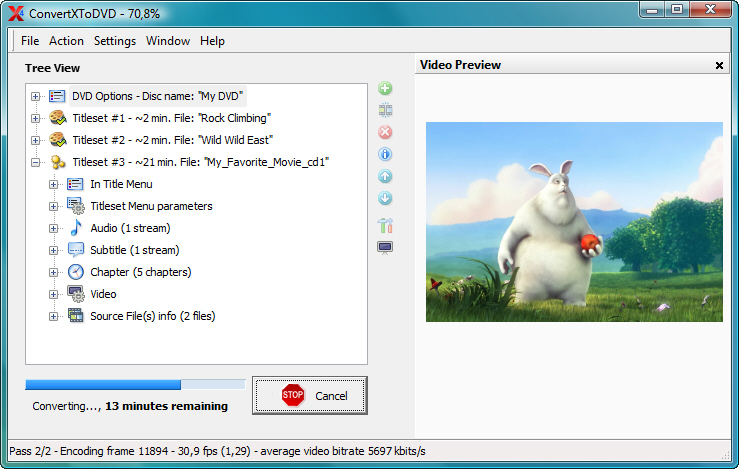
VSO ConvertXtoDVD 4.1.11.351


ConvertXtoDVD (trước kia là DivxToDVD) là phần mềm giúp bạn chuyển đổi và burn các bộ phim của mình vào DVD. Với ConvertXtoDVD và một vài cái click, bạn có thể lưu các bộ phim vào DVD để xem trên đầu DVD gia đình. ConvertXtoDVD hỗ trợ hầu hết các định dạng thông thường như Xvid, MOV, VOB, Mpeg, Mpeg4, MP4, AVI, WMV, DV và các định dạng stream. ConvertXtoDVD chuyển các file của bạn sang một DVD phim và ghi nó trên một DVD media.


Các tỉ lệ có thể được chọn tự động hoặc theo định dạng đặc biệt. Phần mềm làm việc với các định dạng phim NTSC và PAL và tạo các đề tài (chapter) một cách tự động. Hỗ trợ đa âm. Phiên bản 2 có gia diện hoàn toàn mới với khả năng hỗ trợ viết phụ đề và rất nhiều lựa chọn.
VSO ConvertXtoDVD không hề liên kết hay sử dụng công nghệ của Divx Networks!

Các tính năng:
* Hỗ trợ các định dạng: DivX, Xvid, MPEG4, MOV, AVI, WMV, WMV HD, DV ...
* Hỗ trợ các nguồn: máy quay kĩ thuật số cầm tay, TV/Sat, capture cards
* Có thể tạo một bộ phim dài 4 h từ các phim riêng lẻ
* Hỗ trợ các định dạng âm thanh: AC3, DTS, PCM, OGG, MP3, ...
* Xử lí các file phụ đề (.SRT .SUB/IDX) với lựa chọn màu và kiểu chữ, hỗ trợ đánh dấu (chữ nghiêng, chữ đậm)
* Lựa chọn dạng phim: NTSC, PAL hoặc tự động.
* Hình ảnh xem được: Màn hảnh rộng, manh hình đầy đủ hoặc tự động
* Tự động tạo các chủ đề hoặc bạn có thể biên tập nếu muốn
* Có thể xem trước nhanh nếu nguồn không bị lỗi
* Lưu cấu trúc DVD trong đĩa cứng hoặc ghi lên DVD trắng
* Chức năng ghi đĩa đáng tin cậy (hỗ trợ mọi định dạng DVD)
* Chuyển đổi nhanh chóng và chất lượng (1h/ 1phim)
* Có nhiều tùy chọn và cài đặt cho người dùng kinh nghiệm
* Điều khiển được tốc độ và chất lượng chuyển đổi
* Menu điều khiển (tự động khởi động, lặp ...)
* Menu biên tập (nền, fond, màu)
* Có thể thay đổi giao diện (kiểu dáng, cửa sổ dạng thanh công cụ)
* Hỗ trợ nhiều thứ tiếng
* Hoạt động tốt trên Windows 2000 / XP / Vista / 7.

Download: VSO ConvertXtoDVD 4.1.11.351
[Xem tiếp...]


Tìm kiếm Blog này

Tổng số lượt xem trang